
Packet Diagram
A packet diagram draws the bit layout of a network packet or any binary structure — the classic RFC-style field grid. kymo's editor reads the Mermaid packet-beta syntax.
This page works like a quickstart: as you scroll, the pane on the right shows the source and the preview for the section you're reading. Copy grabs the source; ▶ Open in editor loads it into editor.kymo.studio (pick mermaid in the diagram-type dropdown when starting from scratch).
Each line assigns a bit range to a field: 0-15: "Source Port", or a single bit (106: "URG"). Ranges must cover the bits in order without gaps; rows wrap automatically every 32 bits. The example is the TCP header.
The -beta suffix on the header is required — the syntax is still stabilising upstream.
packet-beta
    title TCP Packet
    0-15: "Source Port"
    16-31: "Destination Port"
    32-63: "Sequence Number"
    64-95: "Acknowledgment Number"
    96-99: "Data Offset"
    100-105: "Reserved"
    106: "URG"
    107: "ACK"
    108: "PSH"
    109: "RST"
    110: "SYN"
    111: "FIN"
    112-127: "Window"
    128-143: "Checksum"
    144-159: "Urgent Pointer"
    160-191: "(Options and Padding)"
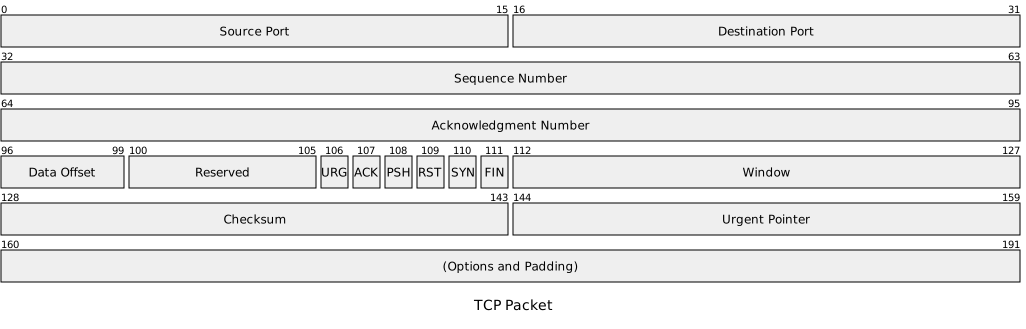
Status. Packet previews on this page and in the editor use the Mermaid renderer; importing packet diagrams into kymo's own pipeline (native SVG/PNG/PDF rendering) is on the roadmap.
See also
- Block Diagram — manual grid layout for general structures.
- Class Diagram — for logical rather than binary structure.