
Architecture Diagram
An architecture diagram shows cloud or CI/CD topology: services with icons, grouped into boundaries, connected by edges. kymo's editor reads the Mermaidarchitecture-beta syntax.
This page works like a quickstart: as you scroll, the pane on the right shows the source and the preview for the section you're reading. Copy grabs the source; ▶ Open in editor loads it into editor.kymo.studio (pick mermaid in the diagram-type dropdown when starting from scratch).
The three statements: group alias(icon)[label] declares a boundary, service alias(icon)[label] in group places a node, and db:L -- R:server connects two services — the letter on each side picks the edge's port (L/R/T/B). Arrowheads are optional: db:L --> R:server.
Built-in icons: cloud, database, disk, internet, server (others need an icon pack registered with the renderer).
The -beta suffix on the header is required — the syntax is still stabilising upstream.
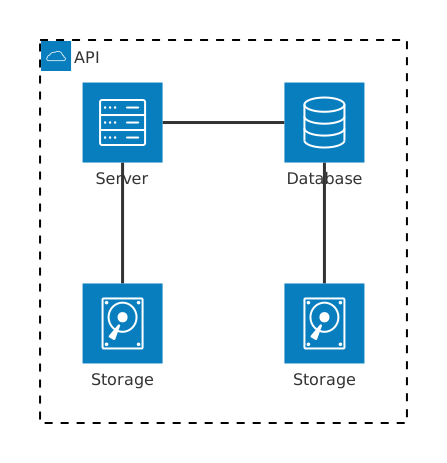
architecture-beta
    group api(cloud)[API]

    service db(database)[Database] in api
    service disk1(disk)[Storage] in api
    service disk2(disk)[Storage] in api
    service server(server)[Server] in api

    db:L -- R:server
    disk1:T -- B:server
    disk2:T -- B:db
Junctions
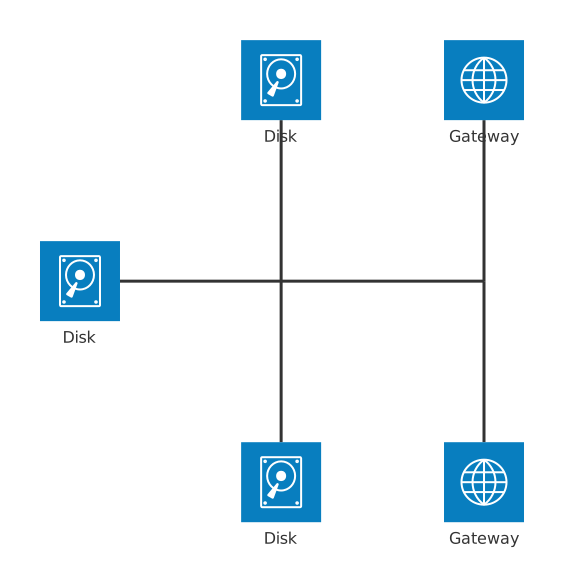
junction alias declares an invisible 4-way connector, letting several edges meet at a point — the way trunk lines split in real network diagrams.
architecture-beta
    service left_disk(disk)[Disk]
    service top_disk(disk)[Disk]
    service bottom_disk(disk)[Disk]
    service top_gateway(internet)[Gateway]
    service bottom_gateway(internet)[Gateway]
    junction junctionCenter
    junction junctionRight

    left_disk:R -- L:junctionCenter
    top_disk:B -- T:junctionCenter
    bottom_disk:T -- B:junctionCenter
    junctionCenter:R -- L:junctionRight
    top_gateway:B -- T:junctionRight
    bottom_gateway:T -- B:junctionRight
Status. Architecture previews on this page and in the editor use the Mermaid renderer; importing architecture diagrams into kymo's own pipeline (native SVG/PNG/PDF rendering) is on the roadmap.
See also
- C4 Diagram — for the formal context/container/component zoom levels.
- Flowchart — free-form architecture sketches kymo renders natively.